
EasyCook AI
🚀 Try Live Demo 💻 View on GitHub
Overview
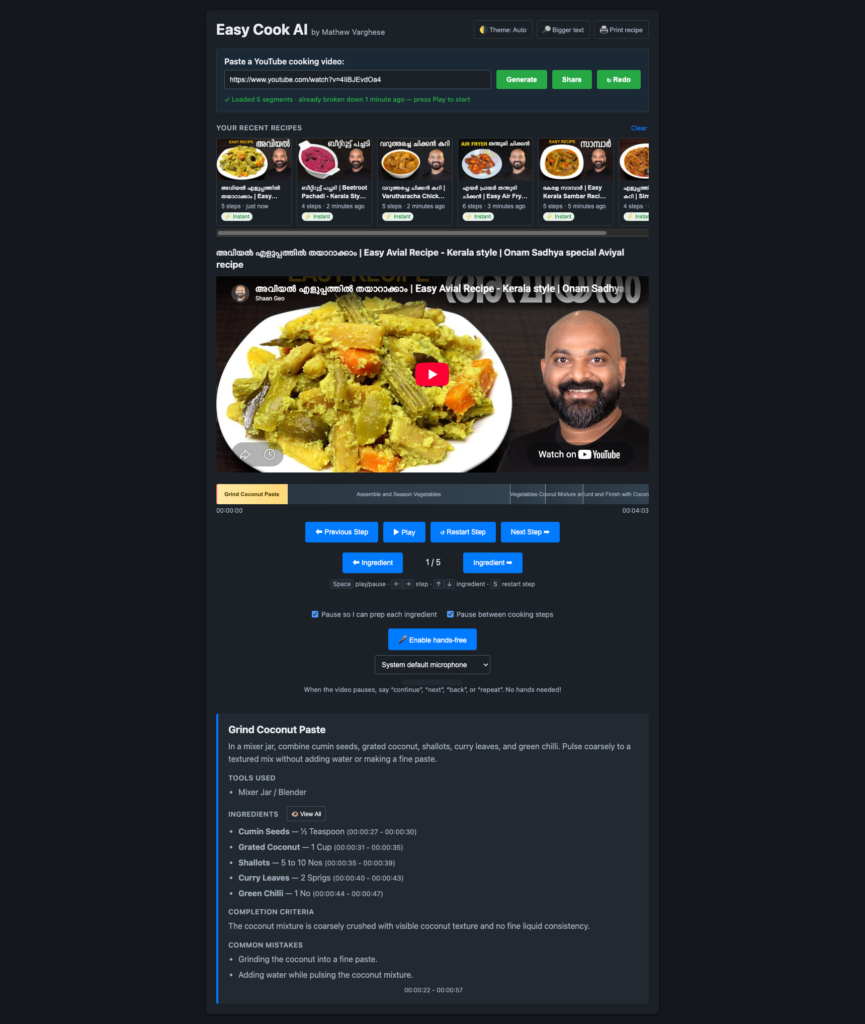
EasyCook AI is an AI-powered recipe extraction system that transforms YouTube cooking videos into structured, timestamped recipes. Using Google’s Gemini API, it intelligently parses video content and syncs extracted recipe segments with the video timeline, creating an interactive hands-free cooking experience.
The Problem
YouTube is full of cooking tutorials, but extracting structured recipes from video is manual and tedious. Viewers have to pause, take notes, or watch repeatedly to gather ingredients and instructions. EasyCook AI automates this process entirely, delivering a clean, timestamped recipe synced perfectly with the video.
How It Works
Architecture
- Backend: Flask API that accepts YouTube URLs and orchestrates the extraction pipeline
- AI Engine: Google Gemini API analyzes video transcripts and content to extract recipe components
- Frontend: Interactive YouTube player synced to extracted recipe segments with timestamped navigation
- Caching: File-backed, video-ID-keyed cache prevents redundant API calls and preserves extracted recipes across deployments
The Pipeline
- User submits a YouTube URL to the frontend
- Backend parses the video ID and checks the cache
- If cached, returns stored recipe instantly; if not, sends to Gemini
- Gemini analyzes the video and returns timestamped recipe segments (title, ingredients, instructions)
- Backend caches the result and returns structured JSON
- Frontend renders recipe segments and syncs the player to jump between steps
Key Features
Intelligent Extraction
The system extracts:
- Recipe title
- Ingredients list
- Step-by-step instructions
- Precise timestamps for each segment
Hands-Free Mode
Voice command support (in browsers with Web Speech API) lets users navigate the recipe without touching the screen:
"play"/"continue"— Resume video"next"— Skip to next ingredient or step- Auto-pause after each ingredient for voice-command readiness
Intelligent Caching
All forms of a YouTube URL collapse to the same cache key. Whether the user provides:
youtube.com/watch?v=IDyoutu.be/IDyoutube.com/shorts/ID- URLs with timestamps, playlists, or query parameters
…the system recognizes the same video and reuses the cached extraction. This saves API quota and provides instant results for popular recipes.
Multi-Process Safe
Cache uses atomic file operations and exclusive locks (flock), so concurrent requests from multiple workers cannot corrupt data—essential for shared-hosting environments like cPanel.
Technical Stack
- Backend: Flask 3.0.0, Python 3.9.23+
- AI: Google Gemini API (models/gemini-3.6-flash)
- Server: Gunicorn (Docker)
- Frontend: Vanilla JavaScript with YouTube IFrame API
- Deployment: Docker, DigitalOcean
API Endpoints
Extract Recipe
POST /extract-recipe
Content-Type: application/json

{
  "youtube_url": "https://www.youtube.com/watch?v=...",
  "force": false
}

Response:
{
  "status": "ok",
  "segments": 12,
  "recipe": [...timestamped segments...],
  "cached": true,
  "video_id": "dQw4w9WgXcQ",
  "cached_at": 1785782831.8
}
Cache Management
GET    /cache              → list all cached videos
GET    /cache/<video_id>  → fetch specific recipe
DELETE /cache/<video_id>  → clear one entry
DELETE /cache              → clear all entries
GET    /health             → cache status, API availability, video count
Deployment on DigitalOcean
EasyCook AI is deployed as a single Docker container on a $4 DigitalOcean droplet, with swap configured for the limited memory. This provides:
- Simplified deployment: one container, one port
- Persistent storage for cache via Docker volumes
- Production-grade gunicorn configuration with multiple threads
- Automatic environment variable injection for API keys
- Easy updates:
git pull && docker compose up -d --build
Quick Start
git clone https://github.com/mathewvarghesemanu/recipe_app && cd recipe_app
echo "GEMINI_API_KEY=your-key-here" > .env
docker compose up -d --build

curl localhost:5001/health
Local Development
scripts/setup.sh       # one-time setup
scripts/run.sh start   # start both servers
# Frontend: http://localhost:8000
# Backend: http://localhost:5001
Security & Production Considerations
- API Key Management: .env never built into images; injected at runtime
- CORS: Enabled for safe cross-origin requests
- TLS: Use nginx or Caddy in front of the container for HTTPS
- Rate Limiting: Firewall or proxy auth to prevent quota abuse
- Non-Root Execution: Container runs as a restricted user
Why This Matters
Cooking videos are abundant but fragmented. Viewers waste time searching for the ingredient list or rewinding to find measurements. EasyCook AI bridges this gap by automating the extraction and indexing that chefs and food bloggers do manually. The result is a faster, more accessible cooking experience that respects both video creators and their audience.
Future Directions
- Multi-language recipe extraction
- Nutritional analysis per ingredient
- Shopping list generation
- Recipe difficulty and time estimates
- Integration with recipe databases
- User annotations and custom segments