
Context-Aware Voice Dictation Using Handy AI
My dictation app kept capitalizing words in the middle of my sentences. So I gave it eyes.
Why local
I used Wispr Flow and Aqua Voice extensively for a long time. They’re good. But I’m not a big fan of shipping my voice off to some cloud service and waiting for text to come back.
I recently got a MacBook Pro with 64GB of RAM, so running models locally stopped being a compromise. These days I use Handy (open-source speech-to-text that runs locally on your machine). You get to pick from a whole shelf of models (Whisper, Parakeet, Moonshine and more), including streaming ones that show the text live as you speak.
The problem
One thing kept bugging me. Say I’ve already typed “The model is fast” and I dictate the rest: “and cheap”. What lands on the page is “The model is fast And cheap.” Capital A, like it’s a brand new sentence.
Why? Handy only hears my voice. It has no idea there’s half a sentence sitting right before my cursor, so every dictation gets cleaned up as if it starts from scratch.
What I built
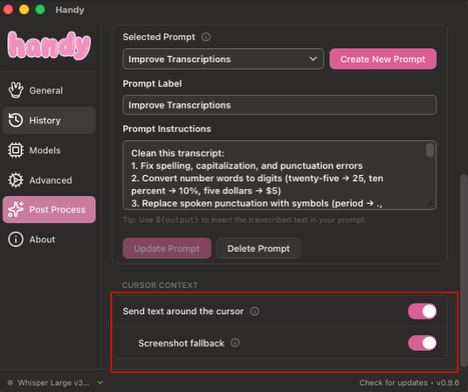
So I added cursor context to my fork. When you stop recording, it reads the text on either side of your cursor in whatever app you’re in. That goes into the post-processing prompt, so the LLM can tell whether you’re starting a new sentence or finishing one.
Some apps (canvas-drawn editors, a few Electron apps and terminals) expose no readable text at all. For those, the screenshot fallback grabs a small square around the cursor and sends that along instead. No separate vision model needed. The post-processing LLM is multimodal, so the same model reads the text and the image. Mine is Gemma 4 12B (MLX build), running locally through Ollama, so nothing leaves the laptop. If the model you pick can’t take images, the request is retried without the screenshot, so post-processing still works.
Guardrails
Reading someone’s screen is not a small thing, so:
- Off by default, macOS only for now
- Only asks for what you turn on: Accessibility to read the text, and Screen Recording only if you enable the screenshot fallback
- Skipped in password fields and under secure input
- Never saved to history, and dropped if you cancel
- The captured text is treated as untrusted. The model uses it for casing and flow only, never as instructions (prompt injection is real)
The most fun bug
Polling the Screen Recording permission while a global keyboard hook was running could freeze input across the whole system. Fixed it by rate-limiting that check and pausing the keyboard hook while the permission prompt is up. It’s been bug-free since.
Try it
Grab the Apple Silicon build from the v0.9.6-context.1 release, or dig into the code in my fork. It’s an unsigned build, so on first launch right-click Handy.app → Open (or allow it in System Settings → Privacy & Security).
Then open Post Process, turn on “Send text around the cursor”, and optionally “Screenshot fallback”.
The post-processing prompt I use isn’t in the repo yet. If you install it and want the prompt, reach out and I’ll share it.
Ps. Handy is by CJ Pais. I just added the code for adding context to the AI as text or image.